
Introduction
If you want to build a second brain, you first have to admit that your first brain is overwhelmed. We are drowning in information. Every day, you consume hundreds of tweets, articles, emails, podcasts, and videos. You think, “That’s a great idea, I’ll remember that for later.”
But you don’t. Two days later, that brilliant idea is gone forever. I used to be a “digital hoarder.” My desktop was covered in screenshots, my browser had 50 open tabs, and my “Notes” app was a graveyard of unfinished thoughts. I felt anxious and scattered because I was trying to use my biological brain to store everything.
Then I discovered the concept of a “Second Brain,” popularized by productivity expert Tiago Forte. The philosophy is simple: Your brain is for having ideas, not for holding them.
In this deep-dive guide, I will show you how to outsource your memory to digital tools. We will cover the CODE framework, the PARA organization method, and exactly how to build a second brain so you never lose a great idea again.
1. The Science: The Zeigarnik Effect
Why does keeping everything in your head make you feel stressed? It is due to a psychological phenomenon called the Zeigarnik Effect.
Russian psychologist Bluma Zeigarnik discovered that our brains hold onto unfinished tasks. If you have an open loop (an unwritten email, a vague project idea), your brain constantly spends energy “pinging” you about it to ensure you don’t forget. This drains your cognitive battery.
When you build a second brain, you close these loops. By writing the information down in a trusted system, you signal to your biological brain, “It is safe to forget this now.” This frees up mental RAM for creativity and problem-solving.
2. The CODE Framework: How to Process Information
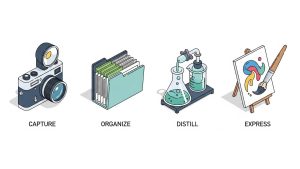
You cannot just save everything randomly. You need a pipeline. Tiago Forte proposes the CODE framework:
-
C – Capture: Save only what resonates. Don’t save entire articles; save the 3 sentences that blew your mind. Use tools like Readwise or simple screenshots.
-
O – Organize: Save things for action, not by subject (we will discuss the PARA method in the next section).
-
D – Distill: Summarize the note. When you look at it in six months, you shouldn’t have to re-read the whole thing. Highlight the bold points.
-
E – Express: This is the goal. Use your notes to create something—a blog post, a project, or a solution to a problem.
3. The PARA Method: Organizing for Actionability
Most people organize their files like a library: by subject (e.g., “Marketing,” “Psychology,” “Finances”). This is a mistake because it doesn’t tell you when you need the information.
To build a second brain that works, use the PARA Method. Organize everything into four categories based on actionability:
-
Projects: Things you are working on right now with a deadline (e.g., “Complete Website Redesign,” “Summer Vacation Plan”). This is your most active folder.
-
Areas: Ongoing responsibilities with no deadline (e.g., “Health,” “Finances,” “Car Maintenance”). You maintain these forever.
-
Resources: Topics you are interested in (e.g., “Web Design,” “Coffee Brewing,” “Architecture”). This is your personal library.
-
Archives: Completed projects or inactive interests. Move things here to keep your workspace clean.
By moving a file from “Resources” to “Projects,” you make it actionable.

4. Choosing Your Tool: Notion vs. Evernote vs. Obsidian
There isn’t one “perfect” app, but there are three main contenders. Choose the one that fits your brain type.
-
The Librarian (Evernote): If you just want to clip web articles, scan PDFs, and search for text inside images, Evernote is the classic choice. It is a digital filing cabinet.
-
The Architect (Notion): If you want to build dashboards, databases, and link tasks to notes, Notion is powerful. It allows you to design your own workspace.
-
The Gardener (Obsidian): If you want to link ideas together like a Wikipedia page, Obsidian is the best. It creates a “knowledge graph” showing how your ideas connect.
I personally use Notion because it blends organization with creativity. But the tool matters less than the habit.
5. The Weekly Review: Keeping the System Alive
A Second Brain is like a garden; if you don’t tend to it, weeds will grow. If you just dump information into an app and never look at it again, you are not building a brain; you are building a digital landfill.
Schedule a 20-minute Weekly Review every Sunday.
-
Clear your desktop and “Downloads” folder.
-
Move new notes into their correct PARA folders.
-
Review your “Projects” folder: What is the next step for each project?
-
Archive anything that is completed.
This maintenance ensures you can always trust your system to build a second brain that serves you, rather than overwhelms you.

6. From Hoarding to Creating
The trap of the Second Brain is “Collector’s Fallacy.” We get a dopamine hit from saving an article, feeling like we have “learned” it. We haven’t.
You must shift from being a collector to a creator. Before you save something, ask yourself: “In what project will I use this?” If the answer is “I don’t know,” maybe don’t save it. Or put it in “Resources” and forget about it. Information is only useful if it leads to action or insight.
Frequently Asked Questions (FAQs)
Q: Do I need to digitize my old paper notes? A: No. That is procrastination in disguise. Start fresh from today. If you need an old note, digitize it on demand. Don’t spend weeks scanning receipts from 2015.
Q: Can I use multiple apps? A: You can, but it’s risky. It creates friction (“Did I save that in Apple Notes or Notion?”). Ideally, have one “Source of Truth” for long-term storage, even if you use a quick capture tool (like Google Keep) on the go.
Q: Is this only for creative work? A: Not at all. It is for anyone who manages information. If you are a student, a parent managing household documents, or a manager, having a system to retrieve information instantly is invaluable.
Q: How do I start if I already have thousands of messy files? A: Do not try to organize the mess. Create a folder called “Archive [Date]” and move everything into it. Start with a clean slate using the PARA method. If you need an old file, search the archive. This prevents “organization paralysis.”
Conclusion
Your biological brain is a terrible office manager. It forgets appointments, loses keys, and gets distracted by shiny objects. By learning how to build a second brain, you fire your biological brain from the job of “storage” so it can get promoted to the job of “CEO.” Stop trying to remember everything. Write it down, organize it, and free your mind for the work that truly matters.