

Introduction
Learning how to use AI tools effectively is quickly becoming the new “typing skill” of the 21st century. I remember the first time I used ChatGPT. I treated it like Google. I typed in, “Write me a blog post about coffee.” The result was boring, generic, and sounded like a robot wrote it. I rolled my eyes and thought, “This AI hype is overrated.”
I was wrong. The problem wasn’t the AI; the problem was me. I was giving a Ferrari to a toddler and expecting a Formula 1 lap time.
Once I started treating AI not as a search engine, but as a brilliant, eager, but slightly literal-minded intern, everything changed. My productivity skyrocketed. I wasn’t replacing my creativity; I was amplifying it.
In this deep-dive guide, I will walk you through the art of “Prompt Engineering.” We will explore the “Act As” technique, the importance of context, and the ethical pitfalls of hallucinations. By the end, you will know exactly how to use AI tools to automate the boring parts of your life and focus on what matters.
1. The “Intern Mindset”: Understanding LLMs
To master AI, you need to understand what it is. Large Language Models (LLMs) like GPT-4 or Claude are prediction engines. They are trained on billions of words to predict the next likely word in a sentence. They don’t “know” facts; they know patterns.
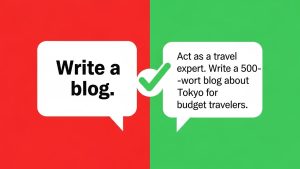
Think of the AI as a hyper-intelligent intern who has read every book in the library but has zero common sense. If you say, “Write an email,” the intern panics. “To whom? What is the tone? Are we angry or happy?”
To how to use AI tools successfully, you must provide the constraints.
-
Bad Prompt: “Write a recipe for cake.”
-
Good Prompt: “Act as a professional French pastry chef. Write a recipe for a beginner-friendly chocolate cake. Use metric measurements and include a tip for keeping it moist.”
The second prompt gives the AI a Persona, a Target Audience, and Specific Constraints.
2. The “Act As…” Technique (Persona Priming)
This is the single most powerful hack in prompt engineering. By telling the AI to adopt a specific persona, you access a specific subset of its training data.
If you ask for medical advice (disclaimer: always consult a real doctor), telling the AI to “Act as a empathetic nurse” will yield a very different tone than “Act as a clinical researcher.”
-
For Business: “Act as a Senior Copywriter with 10 years of experience in SaaS sales.”
-
For Fitness: “Act as a tough-love personal trainer.”
-
For Learning: “Act as a 5th-grade science teacher.”
This technique, often called “Persona Priming” in academic circles like Vanderbilt University’s Prompt Engineering research, sets the tone, vocabulary, and perspective immediately. It prevents the AI from sounding like a generic encyclopedia.
3. “Few-Shot” Prompting: Teaching by Example
Sometimes, instructions aren’t enough. You need to show, not tell. This is called Few-Shot Prompting. Instead of just asking for a result, you give the AI a few examples of what you want.
Example:
-
User: “Convert these movie titles into emojis.”
-
Example 1: Star Wars -> ⭐️⚔️ space
-
Example 2: Titanic -> 🚢🧊💔
-
Task: The Lion King -> [AI fills this in]
By providing those first two examples, the AI understands the pattern instantly. It knows you want emojis and a specific style. This significantly reduces errors. If you want to know how to use AI tools for data formatting or creative writing, giving examples is the shortcut to perfection.

4. Chain of Thought: Show Your Work
LLMs are bad at math and complex logic if you rush them. If you ask a complex riddle, the AI might guess the answer and get it wrong. However, if you add the phrase: “Let’s think step by step,” magic happens.
This forces the model to generate its reasoning before its final answer. This is called “Chain of Thought” prompting.
-
Standard: “How many tennis balls fit in a bus?” -> AI guesses a random number.
-
CoT: “How many tennis balls fit in a bus? Let’s think step by step.” -> AI calculates the volume of the bus, the volume of a ball, accounts for empty space, and then gives an answer.
This simple phrase has been shown to drastically improve accuracy in logic and math tasks.
5. The Hallucination Danger: Trust but Verify
Here is the danger zone. AI tools are confident liars. They suffer from Hallucinations. Because they are predicting the next word, they will sometimes invent facts, citations, or court cases that do not exist, simply because they “sound” plausible.
Rules for Safety:
-
Never use AI for factual stats without checking the source.
-
Never use AI for legal or medical advice without professional review.
-
Use AI for creative work (ideas, drafts, emails) where factual accuracy is less binary, or use tools like Microsoft Copilot or Perplexity AI that cite their sources.
Understanding these limitations is a critical part of knowing how to use AI tools responsibly.

6. Iterative Refinement: Treating it Like a Conversation
New users make the mistake of typing one prompt, getting a mediocre result, and quitting. Power users treat it like a conversation.
-
“That was good, but make it shorter.”
-
“Too formal. Make it sound more like a text to a friend.”
-
“Give me 10 more options, but focus on the budget aspect.”
You rarely get the perfect output on the first try. You have to mold the clay. The “Undo” button is your friend, but the “Regenerate” button is your best friend.
Frequently Asked Questions (FAQs)
Q: Will AI replace my job? A: The popular saying goes: “AI won’t replace you. A person using AI will replace you.” Learning these tools makes you faster and more valuable. It removes the drudgery from work, allowing you to focus on high-level strategy.
Q: Is ChatGPT the only good tool? A: No. Claude 3 (by Anthropic) is excellent for writing natural-sounding text. Gemini (by Google) is great for integrating with Google Docs and searching the web. Midjourney is the king of image generation. Different tools for different jobs.
Q: Is my data safe with AI? A: Generally, assume that anything you type into a public AI chatbot could be used to train future models. Do not paste confidential company data, passwords, or personal health info into a public chat. Use “Enterprise” versions for privacy.
Q: Does AI steal from artists? A: This is a heated ethical debate. Generative AI is trained on massive datasets scraped from the internet. While legal in many jurisdictions currently, laws are evolving. It is best to use AI to brainstorm or edit, rather than to copy a specific artist’s style directly.
Conclusion
AI is not magic; it is a multiplier. It multiplies your ability to write, code, plan, and create. But like any tool, it is only as good as the hand holding it. By using personas, giving examples, and verifying the output, you move from being a passive user to an active commander. Don’t be afraid of the technology. Dive in, experiment, and learn how to use AI tools to unlock your full potential.