
Introduction
If you are considering buying refurbished tech in 2025, you are making one of the smartest financial decisions a consumer can make, provided you know the rules of the game. I remember the first time I bought a refurbished laptop. It was 2018, and I desperately needed a MacBook Pro for video editing, but I didn’t have $2,500 to drop on a new machine. I found a “Certified Refurbished” model for $1,600. I was terrified. Was it broken? Did someone spill coffee on it? Would it smell like cigarettes?
When the box arrived, it looked brand new. It smelled new. And it ran perfectly for five years. That experience shifted my entire perspective on consumerism. Why do we pay a “shrink-wrap tax” of 30% just to be the first person to peel the plastic off a box?
However, not all refurbished tech is created equal. There is a massive difference between a factory-certified device and a sketchy “used” phone from a stranger on Facebook Marketplace.
In this comprehensive 1200-word deep dive, I will explain the grading systems used by retailers, the truth about battery health, and show you exactly how to verify a device when it arrives. This is your ultimate guide to buying refurbished tech safely.
1. The Vocabulary: Refurbished vs. Used vs. Open Box
The tech industry uses specific terms to describe the condition of a product. Understanding these definitions is your first line of defense.
-
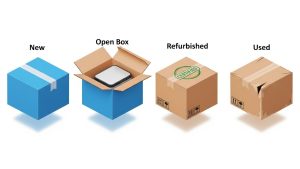
Used / Pre-Owned: This usually means “sold as-is.” The device comes directly from the previous owner. It hasn’t been opened, cleaned, or tested by a professional. It likely has scratches, dirt in the ports, and an old battery. This is the highest risk category.
-
Open Box: This is the hidden gem category. This usually means a customer bought it, opened the box, decided they didn’t like the color, and returned it within 14 days. It is effectively brand new but cannot be sold as “New” legally. You often get a substantial discount for a device that has been used for less than an hour.
-
Refurbished (Renewed): This is what we are aiming for. This means the device was returned to a manufacturer or a professional third-party. They ran diagnostics, replaced broken parts (like screens or batteries), cleaned it, and repackaged it.
When buying refurbished tech, you are paying for that inspection process. You are paying for the peace of mind that a technician has actually looked inside the machine.
2. The “Grading System” Explained
Refurbished sellers use a grading scale to manage expectations regarding cosmetic damage. If you don’t read the fine print, you might be disappointed.
-
Grade A (Excellent / Like New): The screen is perfect. The body might have microscopic scratches that are invisible from 12 inches away. Battery health is usually guaranteed to be over 80% or 90%.
-
Grade B (Good): Visible scratches on the body or casing. The screen should still be free of deep scratches, but you might see light wear. The device functions perfectly, but it looks used.
-
Grade C (Fair): Significant signs of wear. Dents, deep scratches, and aesthetic damage. I rarely recommend this unless you are on an extremely tight budget or buying a device for a child.
Always look for the specific definition of the grade on the seller’s website before buying refurbished tech.
3. The Battery Health Reality Check
The biggest risk in buying a used device is the lithium-ion battery. As we discussed in our Phone Battery Myths article, batteries degrade chemically over time. A phone that is two years old might function perfectly, but if the battery only holds 70% of its original charge, you will be tethered to a wall outlet.
The Golden Rule: Never buy a refurbished device that doesn’t guarantee a minimum battery health.
-
Apple Certified Refurbished: They always replace the battery with a brand new one. This is why Apple’s refurb store is more expensive—it is basically a new phone in a plain white box.
-
Amazon Renewed: Guarantees at least 80% battery health.
-
Back Market: Offers different tiers, but generally guarantees 85%+.
If a listing doesn’t mention battery health, ask the seller. If they won’t answer, walk away.
4. Where to Buy: The Trust Hierarchy
Not all marketplaces are safe. Here is my hierarchy of trust for 2025:
-
Direct from Manufacturer (Apple, Samsung, Dell): This is the safest but most expensive option. You get an official warranty, original accessories, and usually a new battery and outer shell. It is indistinguishable from new.
-
Specialized Refurbishers (Back Market, Gazelle): These platforms specialize in tech. They have strict quality control for their sellers and offer 12-month warranties. I have had excellent experiences with Back Market.
-
Amazon Renewed: Generally safe because of Amazon’s robust return policy. If the device arrives and looks trashy, you can return it easily.
-
eBay Certified Refurbished: Better than standard eBay, as these sellers are vetted and offer warranties.
-
Craigslist / Facebook Marketplace: The Wild West. Only buy here if you can inspect the device in person before handing over cash.
5. The Arrival Inspection: Your 48-Hour Checklist
Once you have committed to buying refurbished tech and the package arrives, your job isn’t done. You need to inspect it immediately while you are within the return window. Don’t just turn it on and assume it works.
The Checklist:
-
Screen: Turn the brightness up to 100%. Open a pure white image to check for “dead pixels” (black dots) or yellow burn-in spots.
-
Ports: Test the charging port. Does the cable wiggle? Does it charge immediately? Test the headphone jack if it has one.
-
Speakers/Mic: Record a voice memo and play it back. Is the sound clear or crackly?
-
Connectivity: Connect to Wi-Fi and Bluetooth.
-
Stress Test: Open multiple apps or play a high-graphic game for 15 minutes. Does the device overheat or crash?
If anything fails this test, return it immediately. Do not try to fix it yourself.

6. The Environmental Impact (E-Waste)
Beyond saving money, there is a moral argument. We generate 50 million metric tons of e-waste every year. Buying a new iPhone generates about 80kg of CO2 emissions (mostly from mining precious metals like gold and cobalt).
Buying refurbished is the single most eco-friendly thing you can do as a tech consumer. You are extending the lifecycle of a product that has already been manufactured. According to the EPA, recycling electronics helps conserve natural resources. By choosing refurbished, you are voting with your wallet against the culture of disposable tech.
Frequently Asked Questions (FAQs)
Q: Do refurbished phones remain waterproof? A: This is a gray area. When a device is opened for repairs (e.g., to change the battery), the original waterproof seal is broken. While good refurbishers re-seal it, it is rarely as water-resistant as the factory seal. Treat refurbished phones as not waterproof to be safe.
Q: What about the warranty? A: Never buy without a warranty. Reputable sellers offer a minimum 90-day warranty, and many offer 1 year. This protects you against defects that might pop up a month later.
Q: Are refurbished hard drives safe? A: I generally advise against buying refurbished storage drives (HDD/SSD). Storage degrades with use, and you are entrusting your data to a drive with an unknown history. The savings are rarely worth the risk of data loss. Stick to refurbished computers, phones, and cameras.
Q: Can I buy refurbished earbuds? A: Technically yes, but hygienically, many people prefer new. However, companies like Apple replace the outer tips and sanitize the device thoroughly. If you buy from a verified source, it is safe, but check the cleaning policy.
Conclusion
The stigma around used electronics is fading, and for good reason. With proper certification and warranties, buying refurbished tech allows you to own flagship devices for mid-range prices. It is a win for your wallet and a win for the planet. Just remember the golden rules: Check the grade, demand a warranty, and inspect the battery. Happy hunting!