
Introduction
Knowing exactly how to spot a phishing scam is the single most important digital skill you can learn in 2025 to protect your finances and identity. I want to start with a confession that might surprise you. Last year, I almost lost access to my primary bank account. I received an email that looked identical to a security alert from my bank. It had the logo, the font, and the tone perfectly mimicked. My heart raced, panic set in, and my thumb hovered over the “Verify Now” button.
I stopped myself at the last second. Something felt “off.” That split-second hesitation saved me thousands of dollars.
The reality is that phishing scams are no longer just poorly written emails from a “Nigerian Prince.” According to the Verizon Data Breach Investigations Report, phishing involves 36% of all data breaches. Scammers are using psychology, AI, and sophisticated design to trick you. They don’t hack computers anymore; they hack humans.
In this comprehensive guide, I will move beyond basic advice. We will explore the psychology of social engineering, dissect real-world examples, and equip you with the tools to spot a phishing scam instantly, whether it comes via email, text, or social media.
1. The “From” Address Deception (Domain Spoofing)
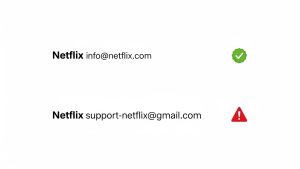
The most common way hackers trick you is by “spoofing” the sender. When you glance at an email on your phone, you often only see the display name (e.g., “Netflix Support”). You trust the name, so you open the email.
To spot a phishing scam, you must expand the header information to reveal the actual email address inside the brackets < >.
-
Real:
[email protected] -
Fake:
[email protected]or[email protected]
Legitimate companies never send security alerts from public domains like Gmail, Yahoo, or Outlook. Furthermore, look for subtle misspellings, known as “Typosquatting.” Scammers might register amaz0n.com (with a zero) or paypaI.com (with a capital ‘i’ instead of an ‘L’). These visual tricks entice your brain to fill in the gaps and assume legitimacy.
2. The Psychology of Urgency (Social Engineering)
Scammers know that if you have time to think critically, you will catch them. So, they hijack your “System 1” thinking (fast, emotional) to bypass your “System 2” thinking (slow, logical).
They use “pretexting” to create a scenario of immediate crisis. Common triggers include:
-
Fear: “Your account will be suspended in 24 hours.”
-
Greed: “You have won a $500 gift card.”
-
Curiosity: “We noticed a login from Russia.”
If an email demands immediate action, pause. Real organizations like the Federal Trade Commission (FTC) advise that legitimate businesses will not pressure you to act immediately via a link. If you feel your heart rate go up, that is a biological warning sign helping you spot a phishing scam.
3. The Link Hover Test
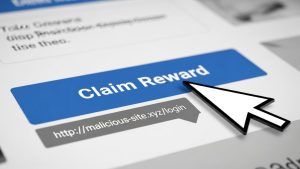
This is your primary defense mechanism on a desktop computer. Before you click anything, hover your mouse cursor over the button or link. A small tooltip box will appear in the bottom-left corner of your browser showing the true destination URL.
Does the button say “Log in to PayPal,” but the link goes to http://secure-login-345.xyz? That is a trap. Also, watch out for “URL Shorteners” (like bit.ly) in unsolicited emails. Scammers use these to hide the final destination. If you can’t see where you are going, don’t go there.
4. The Rise of “Smishing” (SMS Phishing)
Phishing isn’t limited to your inbox. It has migrated to your text messages, a technique called “Smishing.” You might get a text saying: “USPS: We tried to deliver your package but the address was incomplete. Update here: [link].”
Since we all order online constantly, this is highly effective. But ask yourself:
-
Did I order something?
-
Why would the post office have my phone number but not my address?
Usually, these links lead to a fake website asking for a “$0.30 redelivery fee.” Once you enter your credit card info to pay the 30 cents, they steal your card details. Be extremely skeptical of random texts.
5. What is “Spear Phishing”?
While standard phishing is like casting a wide net to catch anyone, “Spear Phishing” is hunting a specific target. Attackers research you on LinkedIn or Facebook. They find out your boss’s name, your job title, or recent events you attended.
Then, they send an email that looks like it is from your boss: “Hi [Your Name], are you in the office? I need you to buy some gift cards for a client quickly.” Because it uses personal details, it feels real. This is why limiting the personal information you share publicly is crucial to help you spot a phishing scam that is targeted directly at you.

6. What to Do If You Clicked (Damage Control)
If you realize you have clicked a phishing link, don’t panic. Act fast:
-
Disconnect: Turn off your Wi-Fi or unplug your internet cable immediately to stop malware from downloading.
-
Change Passwords: Use a different device (like your phone on cellular data) to change the password of the account that was targeted.
-
Scan for Malware: Run a full scan using trusted antivirus software like Malwarebytes or Norton.
-
Freeze Credit: If you gave away your Social Security number or banking info, contact the credit bureaus to freeze your credit.
Frequently Asked Questions (FAQs)
Q: Can I get hacked just by opening an email? A: Generally, no. Modern email providers (Gmail, Outlook) are good at blocking scripts. The danger usually starts when you click a link or download an attachment. Never open an attachment (PDF, ZIP, EXE) unless you were expecting it.
Q: How do I report a phishing email? A: Most email clients have a “Report Phishing” button. You can also forward the email to the Anti-Phishing Working Group at [email protected] or report it to Google’s Safe Browsing team.
Q: Why do phishing emails often have bad grammar? A: Surprisingly, this is sometimes intentional. Scammers use bad grammar to filter out “smart” people who would ask too many questions. They want gullible targets who will overlook errors. However, with AI tools like ChatGPT, scams are becoming grammatically perfect, making them harder to spot.
Conclusion
The internet can be a minefield, but you don’t have to be a victim. Scams rely on you being distracted, frightened, or greedy. By slowing down, checking the sender’s address, and hovering over links, you can dismantle 99% of these attacks. Remember: legitimate companies will never ask for your password via email. Stay skeptical, stay slow, and use these tips to spot a phishing scam before it causes real damage.